 There are no shortages of good commercial burning software (e.g. Nero). But, really, how often does the average computer user need all that extra and intricate editing tools. In my experience, most users just want a simple way to burn files on to a CD or DVD. These can be either data files or video files or what have you. For simple jobs, I highly recommend BurnAware Free Edition. It does'nt have all those bells and whistles found in commercial burning software but, what it does, it does well. What I found particularly useful is its ability to burning video files (e.g. VOB, IFO, BPU...etc.). It has a clean interface making it very easy to use. Best of all it's free.
Showing posts with label freeware. Show all posts
Showing posts with label freeware. Show all posts
Sunday, June 14, 2009
BurnAware the Best Free Burning DVD Software Program
There are no shortages of good commercial burning software (e.g. Nero). But, really, how often does the average computer user need all that extra and intricate editing tools. In my experience, most users just want a simple way to burn files on to a CD or DVD. These can be either data files or video files or what have you. For simple jobs, I highly recommend BurnAware Free Edition. It does'nt have all those bells and whistles found in commercial burning software but, what it does, it does well. What I found particularly useful is its ability to burning video files (e.g. VOB, IFO, BPU...etc.). It has a clean interface making it very easy to use. Best of all it's free.
Monday, January 14, 2008
Free 6 Months Trial of Antivir Antivirus Premium Edition

Try Avira's Antivir Personal Edition Antivirus Premium Free Through Dennis Publication Special
Antivir Antivirus Personal Edition, which is free for personal non-commercial use, is one of my favorite antivirus applications - AVG and Avast Antivirus are the other 2. Antivir has a powerful scanning engine which scans for viruses, worms,Trojan Horses and rootkits. It also scans outgoing e-mail but not incoming e-mail. In addition, the free edition does not scan for spyware or adware. These features are only found in the premium paid version. In addition, the paid version uses a dedicate server for updates while the free edition uses a shared server which downloads updates at a snail pace. I use a fast DSL broadband connection and downloading via the free edition feels like downloading using a 56kps dial up connection. And, as an additional annoyance, after every update, Antivir displays an obnoxious splash screen urging users to upgrade to the paid version.
Thankfully, there is a bit of good news. For a limited time, you can enjoy a free 6 months trial of the premium paid edition. And, all you have to do is fill out a subscription form, which require a name and a valid e-mail address - you don't even need to use your real name or e-mail address. Once you have filled out the form, Avira will send you an email with an activation code and instructions on how to install Antivir. Save the activation code on to your hard drive. Download the premium edition off of Avira's server and start the installation process. During this process, you will be asked to browse to the location of the activation code. That's it. Update the signature database and you are ready to run your first scan.
Sunday, January 06, 2008

Sphinx Software’s Vista Firewall Control
Microsoft touts Windows Vista as its latest and most secure operating system. Starting with Windows XP SP2, Microsoft has included a firewall which, by default, is enabled. While Windows XP’s firewall only monitors inbound Internet traffic, Windows Vista’s firewall monitors both incoming and outgoing Internet traffic. Windows Vista’s firewall is enabled by default. Windows Vista’s firewall isn’t the most user friendly application. In fact, it is downright impossible to customize. It does not allow users to set rules for traffic. Thankfully, there is a handy utility that can help, namely, Vista Firewall Control (VFC).
There is both a free and paid version of VFC. With the free VFC program, users can choose what type(s) of connections applications can make. For example, users can allow applications to make both types of connections, only one type of connections or block both. In addition, users can choose to apply it only once or apply it all the time. VFC doesn’t have all the bells and whistles found in other paid firewall programs; however, if you want to keep Windows Vista’s firewall then VFC can give you more control over the it. For those who want the bells and whistles, there are several free firewalls which support Windows Vista, such as: Comodo Firewall Pro, PC Tools Firewall Plus and ZoneAlarm.
Tuesday, January 01, 2008

Spyware Doctor Starter Edition
Threats to computer security have changed drastically in the past decade. While once the greatest threat to computers were viruses written by introverted teenagers seeking bragging rights, now, the greatest threat is spyware written by criminals for profit. For the most part, viruses are destructive. Spyware, by nature, seeks to steal information (e.g. user ids, passwords, account numbers…etc.). Optimally, any computer connected to the Internet should have a firewall, antivirus and anti spyware installed. That’s a lot of software but you don’t need to spend a ton of money to secure your computer. In fact, you don’t need to spend a dime. If you are looking for a good free anti spyware program, look no further. PC Tools offers a free version of its very popular and effective Spyware Doctor. Spyware Doctor has earned high honors from both PC World and PC Magazine.
While the commercial version of Spyware Doctor regularly sells for $29.95, Google Pack offers a starter edition of Spyware Doctor for free. The starter edition uses the same scanning engine as its big brother; however, it lacks a number of real time protection features. Specifically, the starter edition does not offer real time protection for web browsers, Windows processes, network connection and startup programs. In short, the starter edition does not monitor and block unwanted changes to browser settings, addition of new Windows processes, changes to network settings and addition of startup programs. However, it does offer real time protection for files. Still, even without these real time protection components, it does an outstanding job of detecting and removing both inactive and active spyware.
To download the starter edition, you have to go through Google Pack installer. On the main webpage, uncheck all items expect Spyware Doctor. Next, click [Download Google Pack]. When prompted, save the Google_Updater.exe file to your desktop or some other accessible location on your computer. When you are finish, double click the executable file to start the download process. Once you have successfully installed Spyware Doctor, you need to update its definitions. To do so, on the main menu, click [Smart Update]. The initial update can be long depending on your Internet connection. After the update, click [Start Scan] > select “Full Scan” > click [Scan Now]. Be sure to quarantine any suspicious files. Spyware Doctor, by default, will create a system restore prior to any removal. I highly recommend that you keep the default settings. To schedule a scan, click [Settings] > [Scheduled Tasks] > highlight a task and click [Edit] to edit a task or click [Add] to add a new task.
Of course, the starter edition’s main menu has a radio button to upgrade to the full commercial version. Still, I am happy that PC Tools didn’t make the upgrade button too conspicuous. For those who want additional protection to cover the areas which the starter edition lacks, I highly recommend Bill Studio’s Winpatrol. There is a free and paid version of Winpatrol. For most users, the free edition is just fine. Winpatrol will monitor any changes to browser settings, startup programs, Windows services, Windows processes and Hosts file. I use Winpatrol and I find it indispensible.
Tuesday, December 11, 2007
BurnAware Free Burning Software

BurnAware is a free alternative to Nero and Roxio burning software. BurnAware can burn data, audio, image and video files to almost any CD/DVD media. There is no shortage of free burning software – DeepBurner comes to mind – but BurnAware is the first free alternative that burns video files effortlessly. It is incredibly easy to use. There is a main menu where you select what type of media file you want to burn. Next, you browse to where the file is located on your hard drive or optical drive and BurnAware does the rest. BurnAware doesn’t have the advance features you would find in Nero and Roxio. However, the average user rarely uses these advance features anyway. So, if you are shopping for free burning software, you don’t need to look and further.
Tuesday, July 17, 2007
Removing Rogue Antispyware
Malwarebytes.org
Unfortunately, not all advertised antispyware applications are legitimate security software. In fact, for some time now, there are scores of what are commonly called "Rouge Antispyware" programs. These programs advertise to remove spyware when, in truth, they add spyware to computers. Oftentimes, these programs install themselves without the user's knowledge or consent. Once installed, they display ominous messages warning the user that their computer has been infected with spyware and scare them to purchase their product to remove them. Sadly, the only spyware installed is the rogue antispyware program. Oftentimes, these programs are incredibly hard to remove, even genuine antispyware programs have a hard time remove all their files. Thankfully, there is a free utility, RougeRemover, which can remove a long list of rogue antispyware programs. If you find yourself in a position where your computer is possibly infected with rogue antispyware, try RougeRemove which is absolutely free and is the real deal. Here is the list of rogue antispyware programs which it can remove.
Unfortunately, not all advertised antispyware applications are legitimate security software. In fact, for some time now, there are scores of what are commonly called "Rouge Antispyware" programs. These programs advertise to remove spyware when, in truth, they add spyware to computers. Oftentimes, these programs install themselves without the user's knowledge or consent. Once installed, they display ominous messages warning the user that their computer has been infected with spyware and scare them to purchase their product to remove them. Sadly, the only spyware installed is the rogue antispyware program. Oftentimes, these programs are incredibly hard to remove, even genuine antispyware programs have a hard time remove all their files. Thankfully, there is a free utility, RougeRemover, which can remove a long list of rogue antispyware programs. If you find yourself in a position where your computer is possibly infected with rogue antispyware, try RougeRemove which is absolutely free and is the real deal. Here is the list of rogue antispyware programs which it can remove.
Thursday, May 03, 2007
TrendSecure | TrendProtect™ Overview
TrendSecure TrendProtect™ Overview
Many of you might be familiar with Trend Micro, a leading security software company. Trend Micro Internet Security Suite is one of the most popular security software bundle. What you might not know is that Trend Micro has a number of free products which can protect Internet users. With phishing scam on the rise, there is an increasing need to identify fake websites. TrendProtect is a plugin for both the Internet Explorer and Firefox web browsers which identifies phish websites. In addition, the plugin also scans individual webpages for malicious content. For a more in-depth review of TrendProtect read PC Magazine's review article.
Many of you might be familiar with Trend Micro, a leading security software company. Trend Micro Internet Security Suite is one of the most popular security software bundle. What you might not know is that Trend Micro has a number of free products which can protect Internet users. With phishing scam on the rise, there is an increasing need to identify fake websites. TrendProtect is a plugin for both the Internet Explorer and Firefox web browsers which identifies phish websites. In addition, the plugin also scans individual webpages for malicious content. For a more in-depth review of TrendProtect read PC Magazine's review article.
Wednesday, March 28, 2007
Google Pack Gets Updated
Google Pack
Google Pack has been updated. In response to users' comments, Google has made some changes to the free software programs that make up Google Pack. Previously, Google Pack contained a special version of Symantec Antivirus program, which offered free updates for 6 months. After 6 months, the program will alert users that, in order to continue receiving signature updates, they had to purchase a license. However, in this latest edition of Google Pack, Symantec offers unlimited signature updates. Also, Google has add a special version of Spyware Doctor - Spyware Doctor Starter Kit - to the latest edition. This starter kit version only offers limited real time protection - only OnGuard and File protection - but it is still an awesome addition to the pack. The Google Pack still includes: Picasa, Google Earth, Google Desktop and the other programs found in the previous edition.
Google Pack has been updated. In response to users' comments, Google has made some changes to the free software programs that make up Google Pack. Previously, Google Pack contained a special version of Symantec Antivirus program, which offered free updates for 6 months. After 6 months, the program will alert users that, in order to continue receiving signature updates, they had to purchase a license. However, in this latest edition of Google Pack, Symantec offers unlimited signature updates. Also, Google has add a special version of Spyware Doctor - Spyware Doctor Starter Kit - to the latest edition. This starter kit version only offers limited real time protection - only OnGuard and File protection - but it is still an awesome addition to the pack. The Google Pack still includes: Picasa, Google Earth, Google Desktop and the other programs found in the previous edition.
Thursday, March 15, 2007
Windows Defender 7 Released
Windows Defender home
Today, Microsoft released its latest version of Windows Defender 7. As some of you may know, several years ago Microsoft acquired Giant Software and its anti spyware program. Windows Defender is included in Windows Vista and is a free download for Windows XP users - users must go through Microsoft WGA validation process to install it. Windows Defender provides both real time protection and on demand scanning. Despite Microsoft best efforts, Windows Defender only provides mediocre detection and protection. Unlike antivirus programs, users can use more than 1 anti spyware program. In fact, it is recommended you do. On my computer, I have installed Spybot Search & Destroy, Lavasoft's Ad Aware and Windows Defender and have experience no problem.
Today, Microsoft released its latest version of Windows Defender 7. As some of you may know, several years ago Microsoft acquired Giant Software and its anti spyware program. Windows Defender is included in Windows Vista and is a free download for Windows XP users - users must go through Microsoft WGA validation process to install it. Windows Defender provides both real time protection and on demand scanning. Despite Microsoft best efforts, Windows Defender only provides mediocre detection and protection. Unlike antivirus programs, users can use more than 1 anti spyware program. In fact, it is recommended you do. On my computer, I have installed Spybot Search & Destroy, Lavasoft's Ad Aware and Windows Defender and have experience no problem.
Monday, February 12, 2007
BillP Studios: WinPatrol
BillP Studios: WinPatrol
Winpatrol 2007 has been released. I have spoke about Winpatrol in the past. It is a fantastic free intrusion detection software (IDS) or host intrusion prevention (HIP). Winpatrol monitors several critical areas within Windows OS. For example, it monitors changes to the Windows Registry, Startup programs, Internet Explorer's homepage, IE's default search page, Browser Help Objects (BHO) and many more items. This is the first version which is compatiable with Windows Vista. This newest version also adds startup program delay. I find this feature to be invaluable. Oftentimes, you don't need programs to launch immediately after logging in to your account. The more startup programs a system has the longer it takes start. Of course, you want your antivirus and firewall to start immediately. But, you can delay the start of programs like Microsoft Office or Real Player. A paid version of Winpatrol is available. The paid version adds much more in depth information about processes and software running on the computer.
Winpatrol 2007 has been released. I have spoke about Winpatrol in the past. It is a fantastic free intrusion detection software (IDS) or host intrusion prevention (HIP). Winpatrol monitors several critical areas within Windows OS. For example, it monitors changes to the Windows Registry, Startup programs, Internet Explorer's homepage, IE's default search page, Browser Help Objects (BHO) and many more items. This is the first version which is compatiable with Windows Vista. This newest version also adds startup program delay. I find this feature to be invaluable. Oftentimes, you don't need programs to launch immediately after logging in to your account. The more startup programs a system has the longer it takes start. Of course, you want your antivirus and firewall to start immediately. But, you can delay the start of programs like Microsoft Office or Real Player. A paid version of Winpatrol is available. The paid version adds much more in depth information about processes and software running on the computer.
Sunday, February 04, 2007
Shrinkwrap Licenses: An Epidemic Of Lawsuits Waiting To Happen - News by InformationWeek
Shrinkwrap Licenses: An Epidemic Of Lawsuits Waiting To Happen - News by InformationWeek
As many of you know, software makers oftentimes include End User License Agreements (EULA). Potential users need to agree to the terms spelled out in the EULA before the software application can be installed. Unfortunately, the vast majority of people don't bother reading the EULA; instead, people usually scroll down to the "I Agree" portion and proceed to install the software without realizing what they have agreed to. Would you agree to allow the software program to record what other software programs are installed on your computer? Would you agree to allow the software program to remove record your activity on the Internet? Chances are you wouldn't but, by signing off on the EULA, you may very well have done just so!
Like many other people, I am also very intimidated by the wording of EULA's. Almost without exception, they are written in a language which is incomprehensible to average Joe Schmo. You need to be a lawyer to understand the jargon. Well, there is a way to check if an EULA is safe to agree to without having to get law degree. You can use Javacool Software's free EULAlyzer. It is a simple tool which analyzes an EULA searching for key words, such as: third party and/or sponsors. Basically words which are often found in less than reputable EULA's. Don't neglect to check the EULA. It might very well save you from a ton of grief. As I oftentimes say, "A pinch of caution is better than a pound of trouble."
As many of you know, software makers oftentimes include End User License Agreements (EULA). Potential users need to agree to the terms spelled out in the EULA before the software application can be installed. Unfortunately, the vast majority of people don't bother reading the EULA; instead, people usually scroll down to the "I Agree" portion and proceed to install the software without realizing what they have agreed to. Would you agree to allow the software program to record what other software programs are installed on your computer? Would you agree to allow the software program to remove record your activity on the Internet? Chances are you wouldn't but, by signing off on the EULA, you may very well have done just so!
Like many other people, I am also very intimidated by the wording of EULA's. Almost without exception, they are written in a language which is incomprehensible to average Joe Schmo. You need to be a lawyer to understand the jargon. Well, there is a way to check if an EULA is safe to agree to without having to get law degree. You can use Javacool Software's free EULAlyzer. It is a simple tool which analyzes an EULA searching for key words, such as: third party and/or sponsors. Basically words which are often found in less than reputable EULA's. Don't neglect to check the EULA. It might very well save you from a ton of grief. As I oftentimes say, "A pinch of caution is better than a pound of trouble."
Tuesday, January 23, 2007
Windows Vista Upgrade Advisor
Windows Vista Upgrade Advisor
As Microsoft newest operating system, Windows Vista, is about to be rolled out to the public, Microsoft has released Windows Vista Upgrade Advisor. Windows Vista Upgrade is a free download. It is a small utility which scans a computer to check to see if it is compatible with Windows Vista. As many of you know, Windows Vista requires a great deal more hardware than previous Windows versions. Windows Vista Upgrade Advisor not only scans the hardware but the software as well. It scans to check if already installed programs and drivers will work after making the switch. In addition, it even helps you pick with version of Windows Vista is best for your needs.
As Microsoft newest operating system, Windows Vista, is about to be rolled out to the public, Microsoft has released Windows Vista Upgrade Advisor. Windows Vista Upgrade is a free download. It is a small utility which scans a computer to check to see if it is compatible with Windows Vista. As many of you know, Windows Vista requires a great deal more hardware than previous Windows versions. Windows Vista Upgrade Advisor not only scans the hardware but the software as well. It scans to check if already installed programs and drivers will work after making the switch. In addition, it even helps you pick with version of Windows Vista is best for your needs.
Friday, January 19, 2007
Review: Six Rootkit Detectors Protect Your System
Review: Six Rootkit Detectors Protect Your System
Serdar Yegulalp, of InformationWeek, has written a fine review of 6 "free" rootkit detection and removal utilities. Rootkits are a new form of malware which has proven to be incredibly hard to remove. Rootkits install themselves deep within Windows system core making them difficult to detect. The rootkit itself is not the greatest danger; instead, it is its ability to hide other malware which makes it a big threat. Think of it as a one - two punch. The rootkit hides spyware - any many other form of malware - from detection by spyware scanners, allowing it to work freely. For a more in depth look at the dangers of rootkits, read PC World Magazine's article on the subject.
The rootkits detectors mentioned in the article fall in to 2 categories, free for life and free only during the beta testing phase. Many security software vendors are adding rootkit detection to their own all in one Internet security suites. I was surprised the review article left out other rootkit detectors which have been available for some time. Below, I have included a short list of other rootkit detectors available for free download.
Serdar Yegulalp, of InformationWeek, has written a fine review of 6 "free" rootkit detection and removal utilities. Rootkits are a new form of malware which has proven to be incredibly hard to remove. Rootkits install themselves deep within Windows system core making them difficult to detect. The rootkit itself is not the greatest danger; instead, it is its ability to hide other malware which makes it a big threat. Think of it as a one - two punch. The rootkit hides spyware - any many other form of malware - from detection by spyware scanners, allowing it to work freely. For a more in depth look at the dangers of rootkits, read PC World Magazine's article on the subject.
The rootkits detectors mentioned in the article fall in to 2 categories, free for life and free only during the beta testing phase. Many security software vendors are adding rootkit detection to their own all in one Internet security suites. I was surprised the review article left out other rootkit detectors which have been available for some time. Below, I have included a short list of other rootkit detectors available for free download.
- BitDefender Rootkit Uncover (registration required)
- McAfee Rootkit Detective (a.k.a. Stinger)
- Sophos Anti Rootkit
- Trend Micro Rootkit Buster
Wednesday, January 17, 2007
Decrease the amount of resources Ad Aware and Spybot use during scanning
 All computer users should have a antivirus and anti spyware application installed on their computers. Unfortunately, many of you might have noticed that they can be computer resource hogs. It is not uncommon for them to use >95% of the CPU. Recently, I came across a tweak from Tech-Recipe website which described how to decrease Lavasoft's Ad Aware Personal Edition, a very popular free anti spyware scanner, CPU usage. Below, I have reproduced the steps for this tweak:
- Open Ad-Aware and click on the Gear button to open the Configuration Window.
- Click the Tweak on the bottom of the left column.
- Click the + next to Scanning Engine.
- Click the x next to Run scan as background process (Low CPU usage) to change it to a checkmark.
- Click the Proceed button to save your settings.
- Close Ad Aware
After reading the article, I wondered if the same tweak could be performed in Spybot Search & Destroy, another very popular free anti spyware scanner. I discovered it was quite easy to apply the same tweak. Below, I have listed the step for this tweaks:
- Open Spybot Search & Destroy.
- Make sure you are using the advanced mode. On the menu bar, click Mode and make sure Advanced mode is selected.
- Click [Settings].
- On the new window, click [Settings].
- Scroll down to Scan Priority and select Lowest.
- Close Spybot Search & Destroy.
Monday, January 15, 2007
PC Tools AntiVirus Free Edition - Virus, Trojan & Worm Protection
 PC Tools AntiVirus Free Edition - Virus, Trojan & Worm Protection
PC Tools, maker of the popular anti spyware scanner Spyware Doctor, has released free versions of its antivirus scanner and firewall. In a not so surprising move, PC Tools tries to expand in to the security software market. More and more, security software makers are developing all in one security solutions. PC Tools doesn't want to be left out. However, PC Tools has a tough road ahead of it. Companies like Symantec and McAfee are well established and it would be difficult for PC Tools to get a foothold in an already tight market. In addition, this might be a case of PC Tools trying to be a "Jack of All Trades" but end up being a "Master of None." I am eager for security experts to test out these new products.
Thursday, January 04, 2007
Take control of your browsing time with Browser Timer
Take control of your browsing time with Browser Timer
Now, here is something interesting. Are you addicted to the Internet? Be honest now. Well, if you want to cut down on the amount of time you spend on the Internet then Browser Timer might be your salvations. Set an amount of time you want to spend on the Internet and Browser Timer will do the rest. Once the elapse time has expired, Browser Timer will kick you off the Internet.
Now, here is something interesting. Are you addicted to the Internet? Be honest now. Well, if you want to cut down on the amount of time you spend on the Internet then Browser Timer might be your salvations. Set an amount of time you want to spend on the Internet and Browser Timer will do the rest. Once the elapse time has expired, Browser Timer will kick you off the Internet.
Thursday, December 28, 2006
Antivir Antivirus Free Edition
Antivir Antivirus Free Edition
There is no shortage of good free antivirus software programs. The 3 most popular free programs are: Antivir, Avast and AVG. Today, I will be talking about my personal favorite Avira's Antivir Personal Edition Classic. It is an excellent antivirus software program, which is both reliable and efficient. It is available free for personal non-commercial use. There is a premium version, which adds POP3 scanning and a dedicated update server.
 Antivir 7.00.00.47 is the latest version, only 12.74MB. I had no problem installing Antivir. Once installed, Antivir prompted me to update the virus signatures and perform a system scan. Updating went smoothly as did the system scan. There's no registration required. The license renews automatically. Antivir updates are free for life. Antivir had a major makeover from version 6.x to 7.x. The user interface is clean and tidy. The Main menu shows the status of Antivir Guard, the most recent update, virus scanner build and expiration date of license.
 Most of Antivir’s settings are accessible via the Configuration menu. In the Main menu, click on “Configuration” or its icon. In the new window, in the upper left hand corner, there is an “Expert mode,” check it. The advance settings are only accessible through the “Expert mode.”
Antivir provides real time, on demand and on access protection. Antivir is always working in the background protection your computer. It works invisibly allowing you to do work without any interruptions. If you are connected to the Internet, it will scan files which are downloaded to your computer. It will scan during both reading and writing of a file. You can use its Scheduler to automatically scan your computer or you can manually start a scan. Antivir has a number of advance features which really makes it stand out, such as heuristic scanning and scanning archives. Antivirus scanners depend on updated virus signatures to both detect and removal viruses. Unfortunately, if there is no virus signature available, antivirus scanners won’t be able to detect them. However, heuristic scanning does not depend on virus signatures but rather it looks for characteristics and behavior common to all viruses, which is great when there is a new virus floating around. To avoid detection by antivirus scanners, virus writers try to hide their viruses in archive file types, such as .zip files. The good antivirus scanners scan within .zip files or any other archival file types (e.g. WinRAR).
 One of my favorite features is the creation of a desktop shortcut which starts a scan you specify. For example, I created a desktop shortcut to scan of all my local drives. In order to start the scan, I just double click on the shortcut. Users can specify which file types to scan. For most users, the default file types are fine. If you elect to scan all file types, you might notice a lag in computer performance.
Antivir’s real time protection is provided by Antivir Guard. Antivir Guard has heuristic scan capabilities as well and you can even adjust the detection level. For most users, the default settings are fine. I don’t recommend making any changes, unless you know exactly what you are doing.
Users can also schedule regular updates of virus signatures. By default, Antivir will update daily as well as scan daily at a time you specify. Also, Antivir will maintain both an event and report log – just in case you want to see what Antivir was doing in the background.
There are a few omissions in the free version of Antivir. Antivir will can outgoing e-mail but does not scan incoming mail. As I mentioned before, POP3 scanning is only available in premium version. For myself, I use the free Gmail and Yahoo! E-mail, both of which scan incoming e-mails. As a result, the lack of POP3 scanning is not of great concern to me. However, for those who use e-mail services without virus scanning, Antivir might not be the best choice for you. Both Avast and AVG antivirus offers both incoming and outgoing e-mail. In addition, updating virus signatures can be slow at times. The premium version has a dedicated server, the free version does not. I’ll admit, when there is a large size update, I have to wait several hours or even a day before I can download it. One thing I find very annoying is, when updating virus signatures, Antivir will display a splash page advertising their premium products. Some might call it adware but there is no such thing as a “free lunch.” It is not a big deal. You can close the splash page at any time.
Antivir’s scan engine is top notched. PC World Magazine reviewed all 3 free antivirus scanners and showed Antivir had superior detection and removal over Avast and AVG. About.com corroborated PC World's findings.
Monday, December 18, 2006
Password Protect Your Files and Folders
 There are several instances in which password protecting files and folders is necessary. For example, you are using a shared computer or you are using a laptop computer with sensitive information. Despite what many might think, password protecting files and folders is neither expensive nor difficult. There is a large number of excellent free privacy software.
 Password protecting files and folders involve encryption. Encryption involves taking the raw data and scrambling it until it is unrecognizable. In order to unscramble the encrypted data, you need a key (a.k.a. password). There are 2 major factors which determine the strength of encryption; they are the quality of the password and what bit encryption was used. A strong password includes:
-
The password should be at least 8 characters, preferably >20 characters.
-
The password should use both upper and lower case letters.
-
The password should contain numbers, preferably without repetition (e.g. password1111) or sequential (e.g. password12345).
-
The password should contain special characters (e.g. @#%$..).
-
Never use complete words (e.g. password).
-
Never include personal information, such as your birth date or last name.
Now, there is no guarantee that your password won’t be cracked but, if you follow the guidelines mentioned above, it will be painfully hard for anyone to do so.
Moving on to what bit encryption was used. It is hard for me to explain. Let me illustrate it. Say you have 2 quarters (coins). If you flip one quarter it can land either head or tail. Now, let’s say you flip 2 quarters, how many unique combinations can you get. Well, you could get (head, head), (head, tail) or (tail, tail) - (tail, head) does not count because it is identical to (head, tail). Now, flip those 2 quarters again and guess the outcome. Whatever you choose, there is a 33% chance you are right (i.e 1 out of 3). Now, imagine, instead of 2 quarters, you use 100 or 1,000. How many unique combinations can you get? There is a whole lot more. With more unique combinations, it is harder to guess the outcome. The same is true for what bit encryption was used. As the number increases, it becomes harder and harder to guess. Most of the programs that I will be discussing provide either 128-bit encryption or 256-bit encryption. As a frame of reference, most online secure websites use 128-bit encryption.
TrueCrypt is a free open source application hosted on SourceForge.net. TrueCrypt offers several types and level of encryption, including 265-bit encryption. TrueCrypt can encrypt a partition of a hard drive or even an entire jump drive (e.g. flash drive or thumb drive). In TrueCrypt, you create a virtual drive and save your files in to it. To access the virtual drive, you have to mount it - much like mounting a .iso image file on to a virtual drive. I use Truecrypt myself. Personally, I found the controls hard to use. However, Lifehacker.com has a great TrueCrypt tutorial.
AxCrypt is another free open source application hosted on SourceForge.net. AxCrypt offers 128-bit encryption. AxCrypt works differently than TrueCrypt. AxCrypt adds an option to the right click contextual menu. You can encrypt a file by simply right clicking its icon and select AxCrypt. AxCrypt creates an encrypted version of the file. You can choose to keep or not keep the unencrypted version. AxCrypt is fairly easy to use. However, if you run in to any problems, Jameser’s website has an excellent tutorial.
Cryptainer LE is a free encryption application from Cypherix, a security software maker. Cryptainer offers 128-bit encryption. Unfortunately, the free version only allows you to encrypt up to 25 MB. To encrypt more, you have to switch to the paid version. It works very much like TrueCrypt. You create a virtual drive which you have to mount in order to access it. I don’t know of any tutorials for Cryptainer but Cypherix’s website has a good FAQ section.
Honorable Mentions
There are 2 other encryption applications which are worth mentioning. EncryptOnClick is a free program from software maker 2BrightSparks. EncryptOnClick offers 256-bit encryption. It can encrypt both files and folders. EncryptOnClick works very much like AxCrypt. As its name implies, right click on any file or folder and select EncryptOnClick on the contextual menu. The other application is Windows Privacy Folder (WPF). WPF was created by Microsoft but Microsoft does not support it. Microsoft released WPF only to have to withdraw it within the same week (link). WPF requires WGA validation.
Wednesday, November 29, 2006
Ashampoo Burning Studio 2007
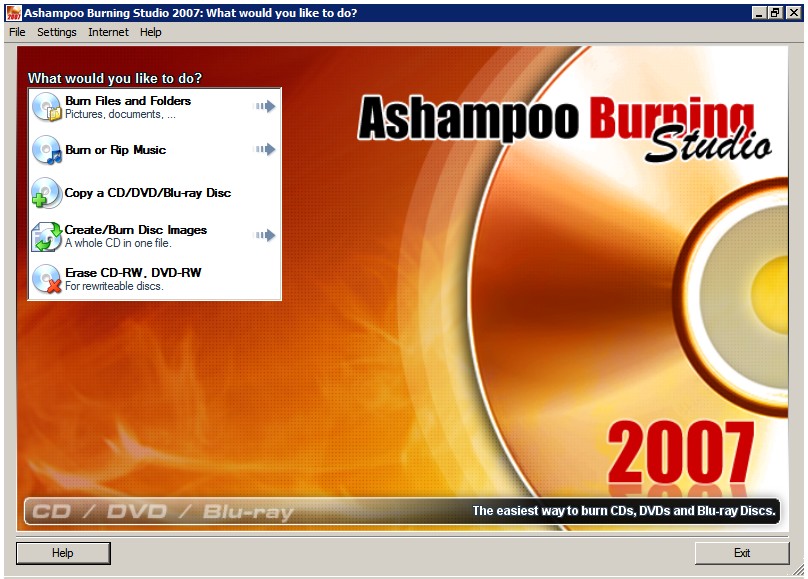
Ashampoo Burning Studio 2007
On Tuesday, November 28th, Ashampoo released a free version of its Burning Studio 2007 (link). This is a limited time offer which will end after December 13th 2006. To get your free copy of Burning Studios 2007, download the software package and install it. During the installation process, you will be prompted to register it. Be sure to select “free full version key.” Next, the software will open your default web browser and load Ashampoo’s registration website. You need to provide a valid e-mail address to receive an activation e-mail from Ashampoo. Once you have received the e-mail, click on the link found within the e-mail. A new window will open. Copy the free license key which appears and paste it on to the installation dialog box. Continue the installation process. Viola, you have now installed Ashampoo’s Burning Studios 2007.
Of course, there is no such thing as a free lunch. By default, Ashampoo will send their newsletter to the e-mail address you provided. You can cancel the newsletter by clicking on the opted out link found on any of their e-mail messages. If you want to play it safe, you can choose to use a disposable e-mail address (e.g. jetable disposable e-mail addresses).
Ashampoo’s Burning Studio 2007 is a decent multimedia suite. Some of its features include: copying data files and folders on to CD/DVD/Blu-ray Discs, ripping and burning audio files to CD/DVD/Blu-ray, copying non copy protected CD/DVD/Blu-ray Discs, creating and burning image files (i.e. iso,cue and bin) to CD/DVD/Blu-ray and erasing rewriteable media (i.e CD-RW and DVD-RW). For copying video files off a CD/DVD/Blu-ray Discs, the program gives you the option of burning it on the fly – provided that you have 2 or more DVD drives – or first copying it on to the hard drive and then duplicate CD/DVD/Blu-ray Discs.
It is a solid package for those you don’t want to spend money on commercial multimedia suites like Nero 7 Ultra Edition or Roxio Creator. Ashampoo’s Burning Studio 2007 is a great alternative. So, hurry up and get your free copy today (link).
Pro's: A nice collection of both audio and video authoring software. It's like a DeepBurner and ImgBurn rolled up in to one. And, you can't beat the price.
Con's: Video authoring is limited. Unlike Nero's Recode and DVDShrink, it can not "shrink" video files. As mentioned before, there is no such thing as a free lunch. For a free license key, you have to provide a valid e-mail address, which Ashampoo will most likely used to flood you with spam about their other products.
Tuesday, October 31, 2006
AVG Anti Virus: Stay protected with AVG 7.5
AVG Anti Virus: Stay protected with AVG 7.5
Grisoft announced it will discontinue its free edition of AVG Antivirus 7.1. However, users can upgrade the free edition to AVG Antivirus 7.5. As some of you may know, AVG is one of the most popular free antivirus application, others include Antivir and Avast. Support for version 7.1 will end on January 15th, 2007. By the way, Grisoft's AVG Anti-Spyware application remains free for personal use as well.
Grisoft announced it will discontinue its free edition of AVG Antivirus 7.1. However, users can upgrade the free edition to AVG Antivirus 7.5. As some of you may know, AVG is one of the most popular free antivirus application, others include Antivir and Avast. Support for version 7.1 will end on January 15th, 2007. By the way, Grisoft's AVG Anti-Spyware application remains free for personal use as well.
Subscribe to:
Posts (Atom)